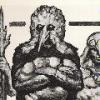
zad fnark 10 Posted April 13, 2010 I get this occasional situation: I'll be playing just fine until this happens: It doesn't come up consistantly, where I can reproduce it at will, and it doesn't happen every time I play, but it's a pain when it does. I'm hoping it's something in NVidia's settings I can tweak and something that someone can help me out here. I'm not coming up with anything on the search, but I don't think I'm using the best keywords for it. My machine: -AMD Phenom II X4 965 Black Edition Deneb 3.4GHz Quad-Core -ASUS M4A78T-E AM3 AMD 790GX HDMI ATX AMD Motherboard -4GB DDR3 RAM -XP Home -EVGA GeForce GTX 285 1GB (Driver: 196.21) I'm using EVGA Precision to keep the GPU fan at around 75% when running any game. The temperature stays between 55 and 60. Except for Object Detail (High), I keep the detail settings at normal. AA is off as well as anisotropic filtering and Postprocess effects. Visibility is at around 5,500 m. I run at 1600x1200 resolution. Thanks, ZF- Share this post Link to post Share on other sites
CarlGustaffa 4 Posted April 14, 2010 I've had this happen only once, and that was after one of the later ACE versions. I had it frequently in Arma1, especially during the later lifetime, also that with ACE. In Arma1 my PC would completely hang for several seconds before screen turned to crap. Sounded to me at the time like a DirectX and memory issue, since it would completely freeze up the machine for a while. HD would work like crazy when it happened. It helped bringing down the graphics settings. In Arma2 when it happened, I was able to just restart the game and everything was fine again. I don't think I was able to pull that off with Arma1, but was forced to a restart. This might be due to improved gfx drivers though. So, try reducing your settings if it is frequent, and see if it helps. Share this post Link to post Share on other sites
zad fnark 10 Posted April 14, 2010 I figured my settings were pretty mediocre to begin with -- especially considering my machine. I did have the hang of a couple seconds before this happened. I Alt-Tabbed out of the program, and when I went back in, all was well again. I noticed that even though I notched the individual settings down to "normal", the global setting at the top right says "very high". does that influence anything at that point? ZF- Share this post Link to post Share on other sites
zad fnark 10 Posted April 22, 2010 Update: I uninstalled some overclocking apps that were on my machine when I replaced my motherboard/CPU. I just kept the EVGA app that came with my NVidia card, so that I can up the fan speed while playing. So far, so good. I've been going for the better part of a week without this happening again. Other "quirky" things have gone away, too. I played ArmA2 online with my brother for an hour and a half last night and all was well. ZF- Share this post Link to post Share on other sites
stk2008 14 Posted April 22, 2010 was gonna say it looked like over heating tbh. Share this post Link to post Share on other sites